

The decision to invest $5,000 in a smart whiteboard is less about the technology and more about overcoming hidden operational frictions that determine its true ROI.
- Platform lock-in with Zoom or Microsoft Teams creates long-term strategic dependencies that go beyond the initial hardware cost.
- User experience issues like input lag and poor remote visibility (“ghosting”) can actively kill creativity and render the investment useless.
Recommendation: Prioritize a comprehensive adoption plan and rigorous testing for user experience factors over a simple feature-for-feature comparison.
As a CTO navigating the return to the office, the pressure to equip hybrid teams with the right tools is immense. The smart whiteboard, often presented as a five-figure silver bullet for collaboration, is likely at the top of your list. The marketing promises a seamless bridge between in-office and remote staff, a vibrant canvas for innovation. But before signing that purchase order, it’s crucial to look past the glossy brochures. From an audio-visual integration perspective, the most common pitfall isn’t buying the wrong brand; it’s underestimating the subtle but powerful frictions that can turn a revolutionary tool into the world’s most expensive, unused television.
Many discussions stop at comparing screen resolution or processor speed. This is a mistake. The real questions are strategic. How does this hardware lock you into a software ecosystem? What is the tangible “feel” of writing on the screen, and why does a few milliseconds of lag matter? How do you ensure remote participants aren’t just staring at a blurry, unreadable mess? And most importantly, how do you overcome organizational inertia to ensure this significant investment drives adoption rather than collecting dust? While some tools like interactive flat panels simply display content, a true smart whiteboard is an integrated system, and its success hinges on these operational details.
This article moves beyond the spec sheet. We will dissect the critical decision points that determine the true value of your investment. We will explore the strategic implications of platform choices, the make-or-break importance of user experience, and the practical steps to ensure your new whiteboard becomes the collaborative heart of your team, not just a line item on an expense report. This is about making an informed decision that yields human-centric ROI—measured in productivity, creativity, and meeting equity.
This guide is structured to walk you through the key challenges and considerations, from high-level strategic lock-in to the specific nuances of a Canadian corporate environment. The following sections provide a clear roadmap for evaluating your next major collaboration technology investment.
Table of Contents: Evaluating Smart Whiteboards for True Hybrid ROI
- Zoom Rooms vs. Microsoft Teams Rooms: Which whiteboard hardware locks you in?
- Writing Feel: Why laggy touchscreens kill creativity during brainstorming sessions?
- Ghosting: How to ensure remote users can actually see what’s being drawn on the board?
- The “Expensive TV” Syndrome: How to get staff to actually use the interactive features?
- Wall-Mounted vs. Rolling Carts: Which setup offers better flexibility for agile teams?
- Adopting AI assistants: The 3-week implementation plan for non-tech teams
- Why voice assistants struggle with regional Canadian accents and how to fix it?
- Why Canadian Enterprises Are Switching to VR for Soft Skills Training?
Zoom Rooms vs. Microsoft Teams Rooms: Which whiteboard hardware locks you in?
The first and most critical decision you’ll make is not about the whiteboard itself, but the ecosystem it lives in. Choosing a smart whiteboard is a de facto long-term commitment to either the Microsoft Teams or Zoom platform. This choice has cascading effects on hardware compatibility, feature access, and subscription costs. The market for these devices is significant and growing, with some analysts predicting the interactive whiteboard market is projected to grow by 41.3% between 2025 and 2030, making the initial platform choice even more impactful.
Microsoft Teams Rooms are designed for deep integration with the Office 365 suite. This means seamless access to Outlook for scheduling and OneDrive for file persistence. If your organization is already heavily invested in Microsoft’s ecosystem, a Teams-certified board offers a native, cohesive experience. Conversely, Zoom Rooms often provide greater flexibility, easily connecting with various calendar systems and offering simpler, link-based access for external participants. However, this flexibility can come at a cost; some core features, like the whiteboard itself, may be paid add-ons rather than built-in components. Ecosystem lock-in isn’t inherently negative, but it demands a conscious strategic alignment with your company’s existing and future software stack.
Understanding the key differences in how each platform handles collaboration is essential. One is not universally better than the other; they are simply different strategic paths. The following comparison highlights the trade-offs a CTO must consider before committing to a hardware purchase.
| Feature | Zoom Rooms | Microsoft Teams Rooms |
|---|---|---|
| Maximum Participants | 1,000 | 300 |
| Whiteboard Integration | Add-on ($2.49/month) | Built-in |
| External Meeting Access | Easy link-based | Requires app/browser limits |
| Connection Stability | Better for poor bandwidth | Standard performance |
| Scheduling Flexibility | Any calendar system | Outlook-dependent |
Ultimately, the choice dictates your path. A deep Microsoft integration promises streamlined workflows for existing users, while a Zoom-centric setup offers broader interoperability. Your task is to weigh which of these philosophies best serves your long-term collaboration strategy.
Writing Feel: Why laggy touchscreens kill creativity during brainstorming sessions?
Beyond software, the physical interaction with the board—the “writing feel”—is a critical, often overlooked, factor in user adoption. A laggy, imprecise touchscreen introduces what we call technology friction. This is the cognitive gap between a user’s intent (drawing a smooth curve) and the screen’s delayed or jagged response. During a fast-paced brainstorming session, this friction is a creativity killer. When the tool cannot keep up with the speed of thought, users will abandon it and revert to analog methods, undermining the entire investment.
The quality of the writing experience is determined by two key technical specifications: touch response time and pressure sensitivity levels. Response time, measured in milliseconds, is the delay between your stylus touching the screen and the digital ink appearing. Premium boards boast a mere 26 milliseconds of response time, which is virtually imperceptible to the human eye. Anything higher can feel sluggish. Pressure sensitivity, measured in levels (e.g., 2,048 or 4,096), dictates how the board interprets varying amounts of force, allowing for natural-looking lines that thicken or thin just like a real marker. A board with low pressure sensitivity will produce monotonous, unnatural lines.
As the NearHub Research Team notes in their “Best Smart Whiteboard Solutions Guide,” the gap between user expectation and technological capability is a significant hurdle.
The limitations of traditional whiteboards are more apparent than ever, creating a real challenge for modern collaboration and education.
– NearHub Research Team, Best Smart Whiteboard Solutions Guide
This challenge is most acute when the digital tool fails to replicate the fluid, intuitive experience of its analog predecessor. To avoid this, insist on a hands-on demonstration for your key stakeholders. Let them draw, write, and erase. The goal is a seamless experience where the technology becomes invisible, allowing ideas to flow without interruption. Don’t rely on spec sheets alone; the feel is everything.
Investing in a board with a superior writing feel is not a luxury; it’s a prerequisite for user adoption. If the interaction feels clunky, your team will simply not use it for the very creative tasks it was designed to facilitate.
Ghosting: How to ensure remote users can actually see what’s being drawn on the board?
For a hybrid team, the single most important function of a smart whiteboard is achieving fidelity parity—ensuring remote participants have an experience equal to those in the room. The most common failure in this area is “ghosting,” where glare, poor lighting, or bad camera angles make the whiteboard content illegible for anyone not physically present. Remote team members are left squinting at a washed-out image, unable to read what’s being written, effectively excluding them from the conversation.
Modern high-end smart whiteboards solve this problem with sophisticated, integrated AI-powered camera systems. These aren’t simple webcams. They use advanced optics and software to dynamically adjust for challenging lighting conditions, eliminate glare from overhead lights or windows, and intelligently frame the content. Some systems can even recognize when a person is standing in front of the board and make their body transparent so the writing behind them remains visible to remote viewers. This technology is the key to making the hybrid meeting equitable.
This image highlights the complexity of the optical systems involved. The multi-lens array and subtle sensor indicators are part of an advanced system designed specifically to capture and transmit clear, legible content, regardless of the room’s conditions.
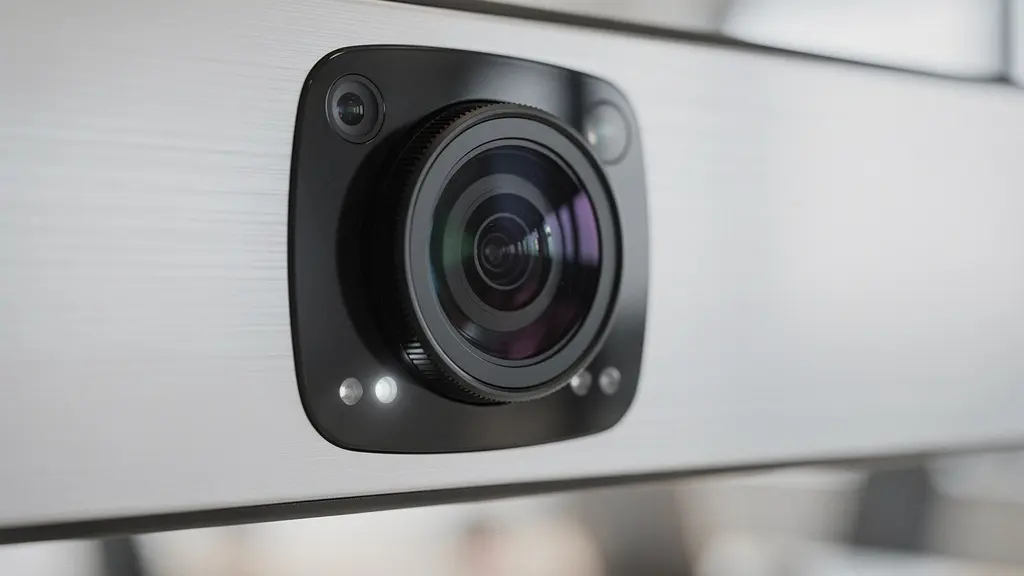
As you can see, this is far more than a simple camera. The quality of these components directly impacts the clarity of the shared image. When evaluating a board, you must test its performance in your actual conference rooms, with their unique lighting challenges. Ask for a demonstration where you dial in remotely and critically assess the legibility of the content. Can you clearly distinguish different colors? Is the text sharp from corner to corner? If the answer is no, the board will fail your remote team members.
Investing in a board with a cheap, ineffective camera system is a false economy. It saves money upfront but ultimately creates a two-tiered meeting experience that disenfranchises remote employees and defeats the purpose of a hybrid collaboration tool.
The “Expensive TV” Syndrome: How to get staff to actually use the interactive features?
The single greatest risk to your $5,000 investment is not technical failure, but human indifference. “The Expensive TV Syndrome” occurs when a feature-rich smart whiteboard is used for nothing more than passive video conferencing display. This represents a complete failure of ROI and creates what I call adoption debt—the ongoing organizational cost of an underutilized asset. While a quality investment can range from $1,500 to over $15,000, its value is zero if staff don’t engage with its interactive capabilities.
Defeating this syndrome requires a proactive, human-centric implementation strategy, not just a technical rollout. It’s about changing habits and demonstrating immediate value. The goal is to make using the interactive features easier and more rewarding than not using them. This involves targeted training, creating accessible resources, and celebrating early adopters. You cannot simply install the hardware and expect organic adoption. You must actively lead the cultural shift.
A structured adoption plan is the antidote to the “Expensive TV Syndrome.” It transforms the rollout from an IT project into a company-wide initiative focused on empowerment. The following checklist provides a concrete, five-step plan to drive meaningful engagement from day one.
Your Action Plan: 5 Steps to Maximize Smart Whiteboard Adoption
- Launch with a ‘Gift of Collaboration’ event – position the investment as a team empowerment tool, not just IT infrastructure.
- Establish department champions – identify power users in each team who can drive local adoption and provide peer support.
- Create quick-win templates – develop pre-made boards for common use cases like sprint planning or project kickoffs.
- Schedule mandatory ‘hands-on’ sessions – ensure everyone gets physical interaction time during the first month.
- Track and celebrate usage metrics – publicly recognize teams that leverage the technology effectively.
Without a deliberate plan to integrate the tool into your teams’ daily workflows, you are setting the stage for failure. The technology is only the starting point; the real work lies in fostering a culture that embraces its potential.
Wall-Mounted vs. Rolling Carts: Which setup offers better flexibility for agile teams?
The physical placement of your smart whiteboard is a surprisingly strategic decision, directly impacting its utility, especially for agile teams. The choice between a fixed, wall-mounted installation and a mobile rolling cart is a trade-off between permanence and flexibility. As an AV integrator, I see many companies default to a wall mount in a primary conference room, but this can severely limit the tool’s potential for dynamic, project-based work.
A wall-mounted setup offers a clean, professional aesthetic. It ensures the board is always in a known, ready-to-use location with no risk of being misplaced. Cable management is neater, and the installation is generally more stable, which can be important for very large or heavy displays. This is an excellent choice for a dedicated executive boardroom or a primary training room where the room’s function is static. However, for agile teams, this permanence is a significant drawback. It tethers collaboration to a single, often overbooked, space.
A rolling cart, by contrast, transforms the smart whiteboard into a shared, flexible resource. It can be moved from a large conference room to a smaller breakout space, a project “war room,” or even an open-plan area for a quick stand-up meeting. This mobility is perfectly aligned with agile principles of adaptable teams and reconfigurable workspaces. The downsides are primarily logistical: carts require more careful cable management to avoid tripping hazards, they can be less stable than a wall mount, and there’s always the risk of the unit not being where you expect it. However, for organizations that want to maximize the utility of their investment across multiple teams and spaces, the flexibility offered by a high-quality rolling cart is often a game-changer.
For a CTO supporting agile methodologies, the default choice should lean towards mobility. A flexible resource that can be deployed where it’s needed most will almost always deliver a higher ROI than a powerful tool locked away in a single room.
Adopting AI assistants: The 3-week implementation plan for non-tech teams
Modern smart whiteboards are more than just digital canvases; they are evolving into hubs for AI-driven productivity. Features like automatic meeting transcription, translation, and AI-generated summaries are becoming standard. However, introducing these powerful tools to non-technical teams requires a thoughtful, phased approach to avoid overwhelming them. A successful rollout isn’t about deploying the feature; it’s about building confidence and demonstrating value in a structured way. A rapid, three-week plan can effectively bridge this gap.
Week 1: Exposure and Awareness. The goal is to introduce the concept without pressure. Start by enabling AI features in low-stakes meetings. Use the AI to generate a summary of a simple team update. Share the transcript afterwards, highlighting its accuracy. The key is passive exposure. You’re simply showing what’s possible and planting the seed of its utility.
Week 2: Guided, Hands-On Practice. This week is for active learning in a safe environment. Schedule dedicated 30-minute training sessions with each team. Don’t just present; facilitate. Have team members use the AI assistant to capture action items from a mock brainstorming session. This hands-on experience demystifies the technology and builds muscle memory. It’s also a chance to gather feedback on what’s working and what’s confusing.

Week 3: Integration and Empowerment. In the final week, the training wheels come off. Encourage teams to use the AI assistant in their regular project meetings. The “department champions” identified in your adoption plan become crucial here, acting as go-to resources for their peers. The goal is for the AI assistant to become a natural part of the workflow, seen as a helpful tool that reduces manual note-taking and improves meeting recall. Other forward-thinking companies are already using similar AI-powered immersive tech for complex tasks, as seen in a case study of Bank of America using VR for soft skills training, where AI provides real-time feedback in simulated client interactions.
By breaking down the adoption process into manageable, week-long sprints, you can transform a potentially intimidating technology into an indispensable asset for your entire organization, regardless of technical proficiency.
Why voice assistants struggle with regional Canadian accents and how to fix it?
A key promise of modern smart whiteboards is hands-free control via voice assistants. Commands like “start transcription,” “zoom in,” or “save whiteboard” can streamline meetings. However, for Canadian enterprises, a significant and often overlooked point of technology friction is the failure of these systems to accurately understand the rich diversity of Canadian accents. Standard voice recognition models, often trained on generic “North American English,” frequently misinterpret commands from speakers with strong Newfoundland, Maritime, or regional Québécois accents, leading to frustration and abandonment of the feature.
This is not just a minor inconvenience; it’s an accessibility and equity issue. When a tool consistently fails for employees from a specific region, it creates a barrier to participation. The problem lies in the training data used for the AI models. If the model has not been exposed to a wide range of phonetic variations, it will default to the patterns it knows, failing to recognize legitimate commands. This can make a team member from St. John’s feel just as unheard as a remote participant staring at a blurry screen.
Fortunately, this is a solvable problem. The solution lies in a combination of careful procurement and proactive configuration. As an AV integrator, we recommend a multi-pronged approach to ensure voice features work for all your Canadian employees:
- Prioritize adaptive devices: Select hardware and software that allow for individual user voice profile training, enabling the AI to learn and adapt to specific accent patterns.
- Demand diverse linguistic models: During procurement, ask vendors to provide evidence that their voice recognition software has been tested on diverse Canadian English models beyond the standard.
- Create a Custom Corporate Dictionary: Teach the AI company-specific acronyms, project names, and, crucially, the correct pronunciations of Canadian cities and regional terms (e.g., “Saskatchewan,” “Etobicoke”).
- Implement accessibility-first testing: Before a full rollout, conduct pilot testing with a panel of employees from different regions across Canada to identify and address recognition gaps early.
The choice of platform can also play a role. As the Speechi Research Team points out, some ecosystems are inherently better designed for accessibility.
When it comes to bridging the gap for meeting participants who are deaf or have impaired vision, for example, Teams offers a much better set of accessibility features.
– Speechi Research Team, Digital Whiteboard for Teams or Zoom Comparison
By proactively addressing the challenge of accent recognition, you ensure that this valuable feature is an inclusive tool that empowers every member of your team, from Vancouver to Halifax.
Key takeaways
- The true cost of a smart whiteboard includes the long-term strategic commitment to a software ecosystem (Microsoft or Zoom).
- User adoption is not guaranteed; it requires a deliberate strategy to overcome the “Expensive TV Syndrome” where the tool is underutilized.
- Technical nuances like input lag (“writing feel”) and poor remote visibility (“ghosting”) are not minor details—they are critical factors that can kill creativity and exclude hybrid team members.
Why Canadian Enterprises Are Switching to VR for Soft Skills Training?
While smart whiteboards excel at collaborative ideation, it’s important for a CTO to see them as one piece of a larger technology ecosystem. For certain applications, particularly complex soft skills training, some leading Canadian enterprises are looking towards even more immersive technologies like Virtual Reality (VR). A smart whiteboard is for collaborating on ideas; VR is for practicing human interaction in a simulated environment. This isn’t a replacement, but a powerful complement.
Companies like Suncor Energy, a major player in Canada’s oil and gas sector, have successfully adopted VR simulations for high-stakes training like hazard identification and emergency procedures. This demonstrates a broader trend: using immersive tech to create safe, repeatable, and scalable training environments that would be impossible or dangerous to replicate in real life. The same principle is now being applied to soft skills. Imagine a manager practicing a difficult performance review with an AI-driven avatar that can simulate dozens of emotional reactions, or a sales team rehearsing pitches in a virtual boardroom.
The effectiveness of this approach is backed by compelling data. Research shows that learning through experience, even simulated experience, dramatically improves retention and confidence. For instance, a landmark PwC study found that employees were up to 275% more confident in applying skills they learned in VR compared to traditional classroom or e-learning methods. This is because VR engages motor skills and emotional responses, creating stronger neural pathways for learning.
For a CTO, understanding this trend is crucial for long-term strategic planning. Your smart whiteboard investment is for the collaborative work of today. A future investment in VR training could be for developing the people who will be using that whiteboard tomorrow. It’s about building a holistic technology strategy that addresses both the “what” (the project) and the “how” (the human interaction).
To ensure your investment avoids these pitfalls and delivers true collaborative value, the next logical step is a tailored needs analysis. This involves assessing your specific team workflows, physical room layouts, and strategic software alignments to recommend a solution that delivers genuine, human-centric ROI.
Frequently Asked Questions About Smart Whiteboards for Hybrid Teams
What are the common tools available in both Zoom and Teams whiteboards?
Both platforms offer basic drawing tools, text insertion, shape creation, and eraser functions. Teams additionally includes a sticky notes feature for collaborative brainstorming, which is a key differentiator for agile-style planning sessions.
Can remote participants see whiteboard content in real-time?
Yes, both Zoom and Teams support real-time whiteboard sharing. However, the quality of this experience can vary. Teams tends to offer better integration with document collaboration within its ecosystem, creating more persistent and easily accessible workspaces after the meeting concludes.
What’s the difference in whiteboard persistence between platforms?
This is a critical workflow difference. Microsoft Teams whiteboards are automatically saved to the cloud and remain accessible as a persistent asset within the meeting’s channel or chat. Zoom, on the other hand, typically requires a user to manually save and export the whiteboard content as an image or PDF file before the meeting ends.